
Storyboarding for Multi-Slide Presentations: Guide 2025
Storyboarding is the key to creating presentations that are clear, engaging, and aligned with your goals. Instead of jumping straight into slide design, start by mapping out your ideas, visuals, and flow. This approach ensures your message resonates with your audience, avoids clutter, and keeps your narrative focused. Whether you're pitching to investors or presenting to clients, storyboarding helps you stay organized and deliver impactful results.
Here’s how to get started:
Define your goals and audience: Know what you want to achieve and tailor your message to your viewers.
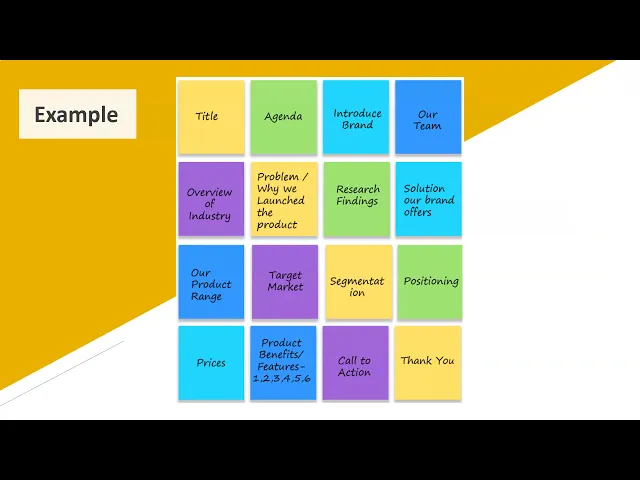
Organize content into a clear structure: Use frameworks like the Three-Act Structure or Problem-Solution-Benefit model.
Plan visuals for each slide: Keep slides simple, focusing on one main idea with supporting visuals.
Ensure smooth transitions: Connect slides logically to maintain flow and audience attention.
Test your storyboard: Practice and gather feedback to refine your presentation before finalizing.
Storyboarding Basics
What Is Presentation Storyboarding?
Presentation storyboarding is the crucial planning step that comes before you dive into PowerPoint or any design tool. Think of it as your blueprint - it maps out your main messages, supporting details, and visuals in a cohesive way. Unlike designing slides one by one, which can lead to disjointed ideas, storyboarding ensures everything flows logically and aligns with your goals. By organizing this visual and content journey upfront, you avoid common pitfalls like cluttered slides, uneven pacing, or confusing layouts. This approach keeps every design decision tied to a clear, strategic foundation. Essentially, it sets the groundwork for creating a seamless, engaging multi-slide presentation.
Core Elements of a Presentation Storyboard
A strong storyboard combines five key components: content mapping, visual planning, flow, audience journey, and timing.
Content mapping: Structures your main ideas and supporting points into a logical sequence, so each idea naturally builds on the last.
Visual planning: Identifies the charts, images, or multimedia elements that best reinforce your message.
Flow: Ensures smooth transitions between slides, maintaining the narrative momentum as you shift from one idea to the next.
Audience journey: Anticipates how your viewers will experience the presentation, considering their knowledge level, concerns, and emotional reactions as they engage with your content.
Timing: Helps you pace the presentation, giving critical moments and key insights the attention they deserve.
Beyond these essentials, an effective storyboard incorporates emotional engagement. It plans for moments that connect with the audience - whether through relatable challenges, inspiring success stories, or thought-provoking questions. It also emphasizes managing attention, ensuring that the most important information stands out. These elements demonstrate why storyboarding is indispensable for creating well-organized, impactful presentations.
Why Storyboarding Matters for Multi-Slide Presentations
When working with multi-slide presentations, it’s easy to fall into the trap of cramming too much onto a single slide. This dilutes your message and leaves your audience overwhelmed. Storyboarding forces you to distill each slide down to one central idea, making your content clearer and more focused. This disciplined approach ensures that every slide supports the larger narrative, delivering a polished and cohesive experience.
How to Create a Storyboard for Multi-Slide Presentations
Step 1: Define Your Goals and Audience
Before diving into slides, take a moment to clarify your objectives and understand who you’re speaking to. These two elements are the backbone of your storyboard.
What do you want your presentation to accomplish? Maybe you’re pitching to investors, seeking approval for a new project, or training your team on a process update. Each scenario calls for a tailored approach. A pitch to venture capitalists, for example, will look very different from an internal training session. The clearer your goal, the easier it is to shape your message.
Equally important is knowing your audience. What’s their background? Are they industry specialists or generalists? What challenges or concerns might they bring to the table? Think about their emotional journey during your presentation - when might they have questions, feel skeptical, or get excited? Understanding these dynamics helps you craft a narrative that resonates.
Once you’ve nailed down your goals and audience, align your message to meet their needs. This alignment will guide every decision you make about your content and structure.
Step 2: Organize Content with a Clear Narrative
With your goals set, it’s time to structure your content into a logical, engaging flow. A well-organized narrative keeps your audience hooked from start to finish.
One approach is the Classic Three-Act Structure, which breaks your presentation into three parts: setup, confrontation, and resolution. Start by setting the stage with context and background. Then, dive into the challenge or opportunity at hand. Finally, wrap up with your solution or key takeaway. This format works especially well for persuasive pitches and project proposals.
Another option is the Problem-Solution-Benefit Framework, which is a favorite for business presentations. Start by identifying the audience’s pain points, then present your solution, and finish by highlighting the benefits. This structure mirrors the decision-making process, making it easy for your audience to follow.
For presentations focused on timelines or processes, a chronological structure might work best. Or, if you’re comparing multiple options, a comparison framework could be the way to go. Choose a structure that aligns with your goals, and break your content into sections that naturally flow from one idea to the next.
Step 3: Plan Visuals for Each Slide
Once your narrative is in place, think about how visuals can bring your message to life. The right visual elements can make complex ideas easier to understand and more engaging.
For example, charts and graphs are great for presenting data, while flowcharts can simplify intricate processes. Visual metaphors or analogies can turn abstract concepts into something relatable. Remember, each slide should focus on one main idea, supported by visuals that reinforce your point. If you’re tempted to cram multiple charts or images onto a single slide, it’s probably a sign to split the content into separate slides.
Consistency is key. Stick to your brand’s color scheme and design style throughout the presentation. This not only looks professional but also caters to different learning preferences by mixing visuals like images, videos, and infographics.
For technical topics, break down complicated ideas with clear diagrams or step-by-step visuals. Analogies can also help make the content more digestible.
Step 4: Create Smooth Transitions Between Slides
A great presentation isn’t just about what’s on each slide - it’s also about how you move between them. Smooth transitions keep your narrative flowing and your audience engaged.
Plan how each slide connects to the next. You can use verbal bridges, like saying, “Now that we’ve covered the problem, let’s look at the solution,” to guide your audience. Visual connections, such as repeating a key icon or color, can also create a sense of continuity. Don’t forget to include moments to pause and emphasize key points.
Think about the emotional rhythm of your presentation. Where can you build tension? When should you offer relief or deliver a big insight? Mapping out these beats ensures your audience stays invested and focused.
As you sequence your slides, ensure the story unfolds logically. This deliberate flow helps highlight critical information at the right moments, making your presentation both impactful and easy to follow.
Storyboarding your Presentation
Advanced Storyboarding Methods for Complex Presentations
When it comes to more intricate presentations, basic storyboarding techniques might not cut it. Advanced methods offer the flexibility needed for scenarios involving multiple stakeholders, technical challenges, or unpredictable schedules. Let’s dive into some strategies to handle these complexities effectively.
Multi-Track Storyboarding for Different Audiences
Imagine presenting to a mixed group - some are laser-focused on technical details, while others care only about the financial impact. Multi-track storyboarding allows you to craft a single presentation that caters to different audience segments without losing its overall flow.
Think of it as designing multiple routes through the same presentation. For example, if you're pitching a software product to both engineers and executives, one path might highlight the technical architecture and implementation, while another emphasizes ROI, market opportunities, and strategic benefits. Both paths eventually lead to the same conclusion, reinforcing your central message.
To pull this off, start with a shared introduction that establishes common ground, then branch into specialized tracks. Before wrapping up, bring the audience back together with shared content, such as risk management or final recommendations. Visual clarity is key - use color coding (e.g., blue for executive-level details, green for technical content, yellow for shared sections) and include a legend so everyone reviewing your storyboard can follow along. This approach also makes it easier to adapt your delivery in real time, depending on who’s in the room.
Transitions are vital here. For instance, if your audience is split between technical and strategic interests, bridge the gap by emphasizing shared priorities like data security before transitioning to how your solution addresses those concerns. This keeps everyone engaged, no matter their focus.
Once you’ve laid the groundwork for multi-track storytelling, it’s time to think about interactivity.
Planning for Interactive and Multimedia Elements
Interactive elements can transform your presentation from a one-way lecture into a dynamic conversation. Polls, Q&A sessions, and group activities not only keep your audience engaged but also help clarify complex points.
When planning these elements, detail everything in your storyboard: their purpose, timing, duration, and how they connect to your narrative. For example, if you’re using a poll, specify the exact question, how the results will be displayed, and how they’ll transition into the next topic. This level of preparation ensures everything runs smoothly and avoids awkward pauses.
Q&A sessions work best at natural breakpoints - like after presenting a challenge or before revealing your solution. Mark these moments in your storyboard to ensure they don’t disrupt the flow. For group activities, include clear instructions, allocate enough time, and prepare any supporting visuals. For instance, if you’re discussing a change management strategy, you might have small groups brainstorm implementation challenges, followed by a facilitated discussion that ties back to your proposed solutions.
To make things even clearer, use icons or symbols directly on your storyboard - like a microphone for Q&A, a chart for polls, or a group icon for activities. This visual shorthand helps your team quickly grasp the presentation’s flow and keeps everything on track.
With interactivity mapped out, let’s explore how modular storyboarding can add even more adaptability.
Modular Storyboarding for Adaptable Presentations
Modular storyboarding breaks your presentation into self-contained sections, or "modules", that can be rearranged or skipped without disrupting the overall narrative. This method is especially useful when you’re dealing with tight time limits or shifting audience needs.
Each module should function as a mini-presentation with its own setup, key message, and conclusion, while still connecting logically to the surrounding sections. For example, in a product launch presentation, you might have core modules like a product overview, market opportunity, and go-to-market strategy. Optional modules - such as competitive analysis, technical specs, or customer testimonials - can be included or left out based on the audience or time constraints.
In your storyboard, clearly label slides as “Core Module,” “Optional Module A,” “Optional Module B,” and so on. Use visual brackets or containers to group related slides, making it easy to adjust the presentation on the fly.
Transitions are crucial here. Instead of referencing skipped content - like saying, “As we discussed in the competitive analysis section” - use broader phrases like, “Looking at the market landscape, our approach offers distinct advantages.” This way, your audience stays oriented, even if some sections are omitted.
Add timing notes for each module to highlight flexibility. This preparation allows you to pivot confidently during the presentation without seeming unprepared.
For high-stakes scenarios, consider scenario-based storyboarding. Anticipate potential objections and prepare evidence-based responses. Mark “must-cover” versus “nice-to-have” content clearly. If your presentation includes branching logic - where audience input determines the next section - map out decision points in your storyboard using a flowchart. And always test multimedia elements in advance to ensure everything runs smoothly when it matters most.
Turning Your Storyboard into a Finished Presentation
Once your advanced storyboard is complete, the next step is transforming it into a polished presentation while staying true to its narrative and visual flow. Keeping the structure intact during this process ensures your original vision remains consistent throughout.
Digital Tools for Storyboarding
The right software can make the transition from storyboard to presentation much smoother. Popular options like PowerPoint and Google Slides offer pre-designed templates and layouts to help you organize your storyboard into a coherent presentation. These tools allow you to start with basic outlines or sketches and refine them into professional slides.
When choosing software, prioritize features that enhance efficiency. Look for options that let you easily import your storyboard, add visuals and text, and maintain formatting consistency. Tools like PowerPoint are particularly helpful because they let you build directly on your storyboard framework, saving time and ensuring uniformity.
For more complex or high-pressure presentations, AI-powered platforms can be a game-changer. These tools provide customizable templates, streamline slide editing, and even analyze audience preferences to create tailored slides. They allow you to rearrange content, add or remove slides, and refine your message without losing sight of your narrative.
The process should follow a clear, step-by-step approach. Start by importing your storyboard into your chosen software, ensuring the narrative flow and slide sequence remain intact. Then, incorporate the visuals - charts, images, diagrams, or videos - that you planned during storyboarding. Make sure every visual supports your narrative rather than serving as mere decoration.
Next, refine the content by adding concise text, impactful headlines, and supporting details. Stick to the principle of one idea per slide to avoid overwhelming your audience. Apply a consistent design style, including a cohesive color palette and typography, across all slides. This methodical approach ensures your storyboard evolves into a polished presentation without losing its structure.
Team Collaboration on Storyboards
When multiple contributors are involved in creating a presentation, maintaining alignment is essential. Without clear guidelines, you risk ending up with slides that feel disconnected or inconsistent.
To avoid this, ensure the entire team reviews and approves the storyboard before anyone begins creating slides. Everyone should understand the narrative, key messages, and visual direction. Assign specific sections or slides to individual team members while maintaining a master storyboard document as the single source of truth.
Collaboration-friendly tools like Google Slides or other platforms with real-time editing features can help. These tools let team members work simultaneously and view updates instantly, minimizing duplication and confusion.
Establish a style guide to define design elements like color schemes, typography, image styles, and layouts. This guide ensures that even with multiple creators, the final presentation feels cohesive. Include details like your color palette, font choices, and layout grids in the guide - it will serve as a reference for every slide.
For presentations with substantial content, use the modular storyboard design you’ve already developed. This approach allows sections to be rearranged or omitted based on time constraints or audience needs while keeping the overall presentation consistent. Regular team check-ins can help catch inconsistencies early, ensuring everyone stays aligned.
For extensive presentations - think 50 or 100+ slides - divide the content into distinct chapters or sections. Use transition slides to signal shifts in topics while maintaining a unified design. A master slide template in your software can enforce consistent formatting and design elements across all slides, preventing last-minute mismatches.
Testing Your Storyboard's Effectiveness
Before diving into full slide production, test your storyboard to ensure it works as intended. Testing helps identify whether your narrative resonates, your pacing is engaging, and your message is clear.
Start with internal review by checking that your storyboard includes emotional beats, logical flow, and appropriate pacing - these are critical for keeping your audience engaged. Evaluate each slide: Does it support a key message? Does it advance the narrative? Does it hold attention? If not, revise or remove it.
Conduct a dry run or practice presentation using your storyboard, whether as rough sketches or early slides. This helps you spot pacing issues, awkward transitions, or moments where the narrative loses momentum. Pay attention to how slides flow into one another - do transitions feel smooth, or are they jarring? Areas where you stumble may need clearer content or visuals.
For external feedback, share your storyboard with a small group of trusted colleagues or representatives of your target audience. Ask specific questions: Did they grasp the main message? Where did they lose interest? Which visuals worked best? Which slides felt unnecessary? This feedback will highlight areas where your visuals or narrative need adjustments.
Also, check whether your storyboard effectively guides audience attention. Key points should stand out, and visuals should enhance understanding rather than distract. If your test audience misses important details or feels overwhelmed, you may need to adjust your visual hierarchy.
Refine your storyboard based on this feedback before moving into detailed design. It’s much easier to address structural issues at this stage than after investing hours in creating polished slides. Testing acts as a safety net, catching problems early and saving time in the long run.
For critical presentations - like investor pitches or high-profile conferences - consider consulting specialists in presentation design. Agencies like Present Partners focus on crafting presentations that combine clear storytelling with impactful visuals, ensuring every slide serves a purpose and aligns with your overall narrative.
Finally, rehearse your presentation multiple times to build confidence and identify any last-minute tweaks needed in slide order, timing, or emphasis. The goal is to deliver a presentation that feels natural and leaves a lasting impression.
Conclusion and Key Takeaways
The techniques outlined above emphasize why a disciplined approach to storyboarding is so important for creating effective presentations. Storyboarding transforms scattered ideas into a clear, strategic framework, helping to avoid issues like information overload, uneven pacing, or disconnected messaging.
Taking the time to build a structured storyboard ensures that every slide serves a purpose, every transition feels seamless, and the overall flow keeps your audience engaged. This methodical process helps you deliver focused messages while maintaining the flexibility to adjust as needed.
From setting clear goals to organizing content, planning visuals, and ensuring smooth transitions, the storyboarding process ensures that each element of your presentation supports your main narrative. Whether you're preparing a sales pitch, a project proposal, or an executive briefing, these principles apply universally. While different situations may require tailored approaches, the foundation remains the same: know your audience, guide them through an emotional journey, and craft content that leads them toward your desired outcome. These steps, as detailed earlier, are key to presentations that secure funding, win clients, and influence decisions.
For high-stakes presentations - where precision and clarity are critical - storyboarding becomes even more vital. It ties directly to strategic planning and teamwork, forming the backbone of presentations that meet important business goals. In such cases, collaborating with experts like Present Partners, a New York-based agency specializing in narrative and strategic presentation planning, can make all the difference in delivering impactful results.
FAQs
How does storyboarding enhance the impact of a multi-slide presentation?
Storyboarding is a powerful tool for crafting impactful multi-slide presentations. It helps you organize the flow of ideas and visuals ahead of time, ensuring your message is clear and aligns with your goals.
By outlining the purpose and content of each slide, storyboarding helps you build a logical narrative that keeps your audience interested from start to finish. It also allows you to spot any gaps or unnecessary overlaps early in the process, saving time during design and leading to a more polished and professional final presentation.
What are some advanced techniques for storyboarding complex presentations tailored to diverse audiences?
When creating a storyboard for complex presentations aimed at diverse audiences, the key is to align your message with the specific needs of each group. Start by defining your main objectives and shaping the narrative to address the unique goals of each audience segment. Structure your slides into clear, logical sections that flow naturally, ensuring the story stays connected and easy to follow.
Visual elements can be powerful tools for clarity. Use diagrams, charts, or infographics to break down complicated ideas into digestible pieces. Make sure these visuals enhance the message rather than distract from it. You might also want to create alternate versions of certain slides to better match the preferences or expertise levels of different audience members.
Before finalizing, review your storyboard through the lens of each audience type. This helps you spot any areas where clarity or relevance might be lacking, ensuring your presentation engages and resonates with everyone in the room.
How can I turn my storyboard into a polished, professional presentation using digital tools?
To turn your storyboard into a polished presentation, start by choosing a digital tool that fits your project, such as PowerPoint or similar software. Organize your slides to follow the structure of your storyboard, ensuring each slide reflects the key points and supports the flow of your narrative.
Pay attention to visual consistency by sticking to a cohesive template, consistent fonts, and a well-matched color palette. Add visuals like images, icons, or graphs to support your message, but avoid cluttering the slides. Keep your text brief and focused, highlighting the most important takeaways.
If you’re looking for expert help, you might want to collaborate with professionals like Present Partners. They specialize in crafting high-stakes presentations, helping refine your content, build a strong narrative, and create visuals that leave a lasting impression while aligning with your objectives.